
Employees Working as Substitutes in School Districts and Educational Service Districts
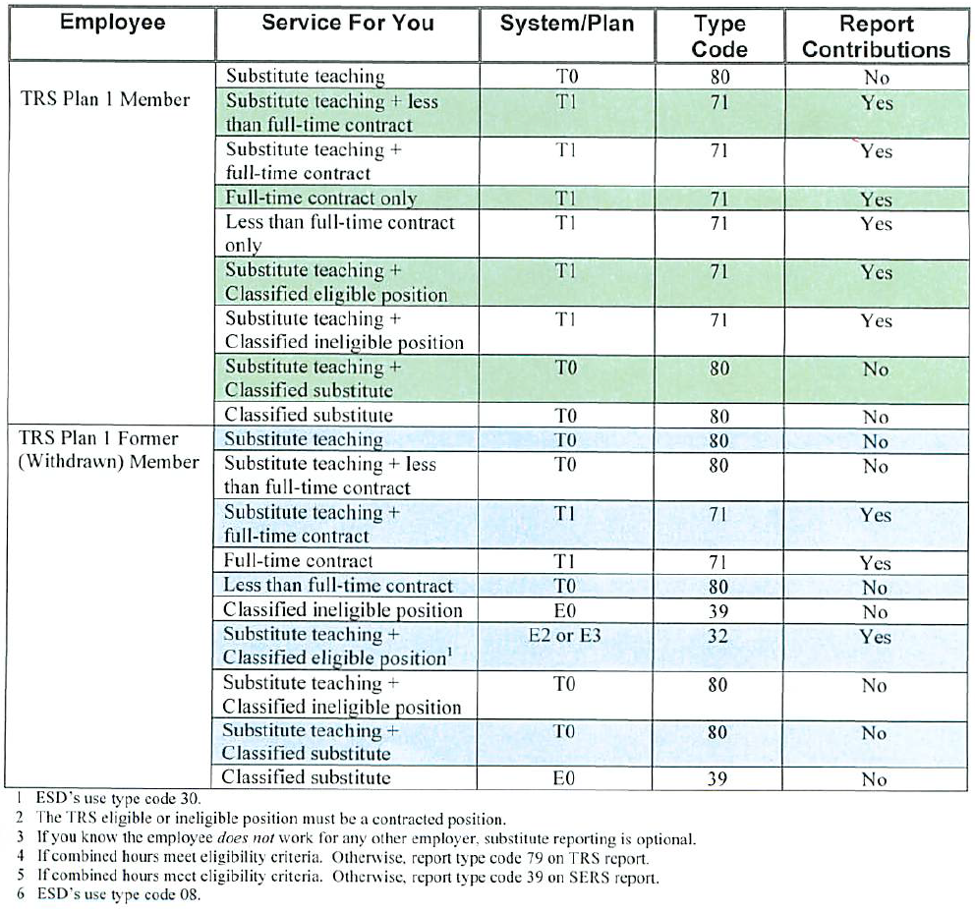
TRS Plan 1
Report compensation for each employee. Report days with System/Plan T1 or type code 80. Report hours for all other examples where indicated. See the chart below to determine the system, plan, type code, and if contributions are reported.
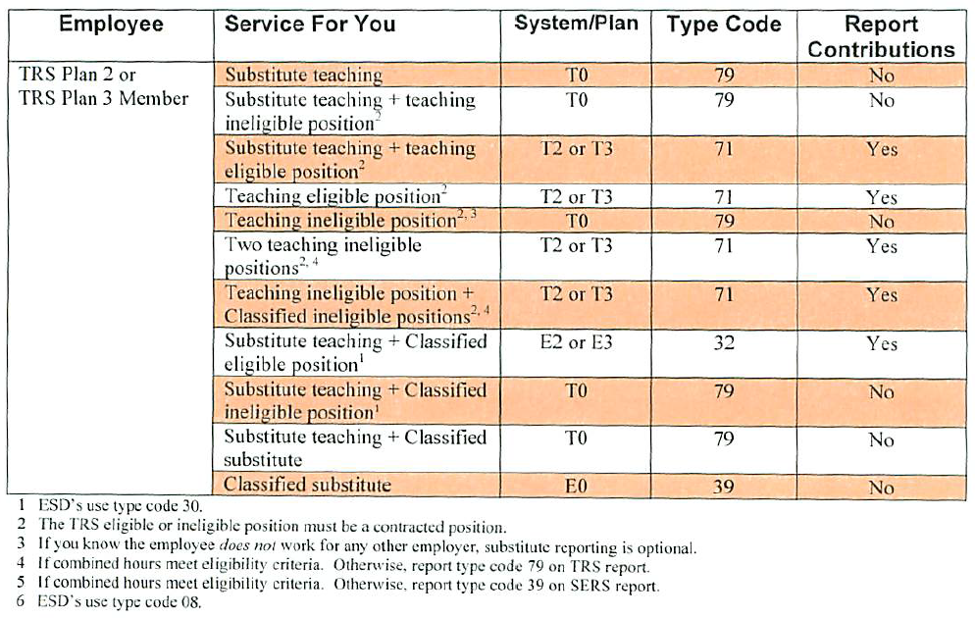
TRS Plan 2 or 3
Report compensation for each employee. Report days with System/Plan T1 or type code 80. Report hours for all other examples where indicated. See the chart below to determine the system, plan, type code, and if contributions are reported.
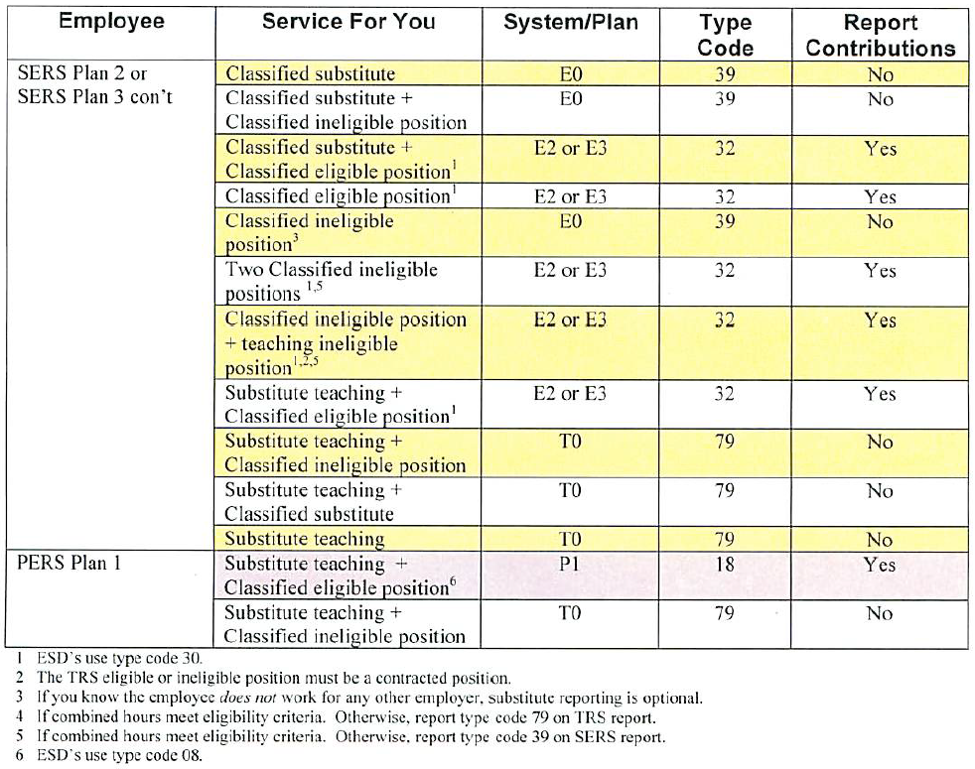
SERS Plan 2 or 3 / PERS Plan 1
Report compensation for each employee. Report days with System/Plan T1 or type code 80. Report hours for all other examples where indicated. See the chart below to determine the system, plan, type code, and if contributions are reported.
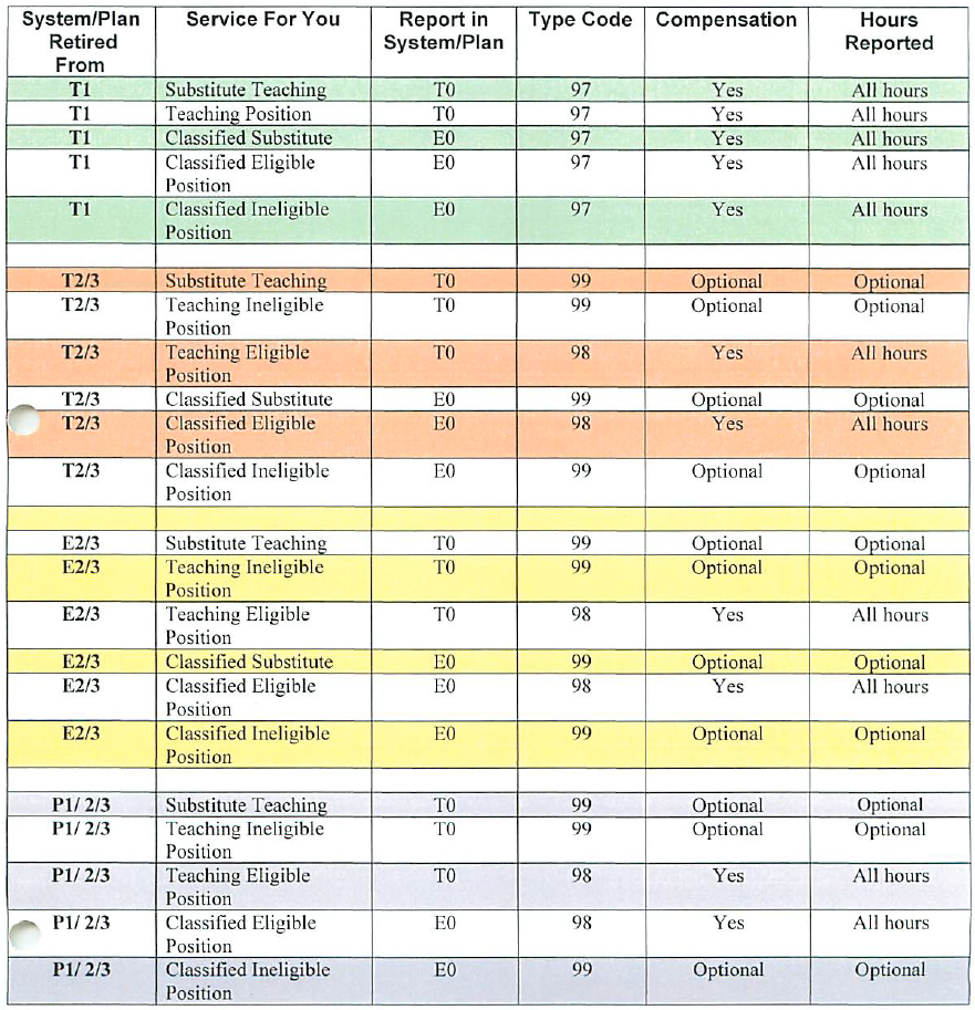
Retirees Working as Substitutes in School Districts or Educational Service Districts
See the chart below to determine the system, plan, type code, compensation, and hours to report for each type of retirees. Do not report contributions. Begin and end dates should be used for new and terminating retirees, and whenever a system or type code changes.
Simplifying Payroll Process / Process Overview
The general payroll process is as follows (not intended to be exact process but general guidelines):
-
Run Retro
-
Run Patch by Payline
-
Run Force Calc to create SYSTM timecards the DRS process can use to report earnings
-
Run DRS Extract which creates reports for reportable earnings and uses interface to send a single payroll deduction and contribution to payroll for withholding
-
Run Force Calc to recalculate payroll and include the DRS deductions and contributions
-
Run Pre-list to validate results
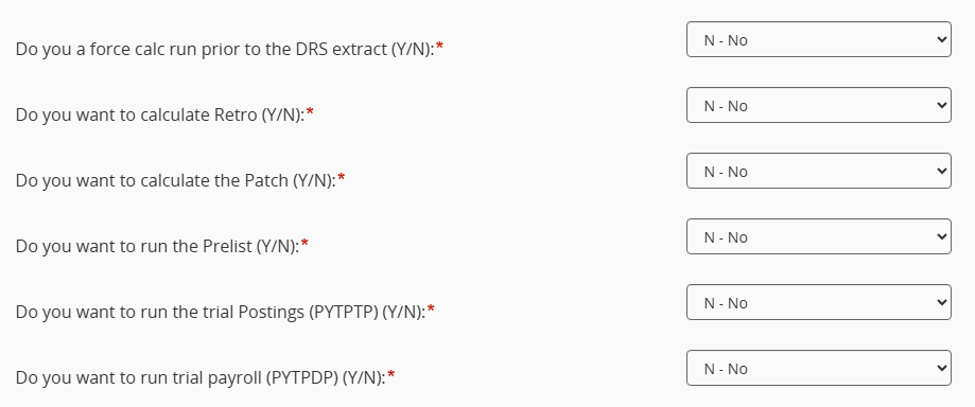
This is the normal payroll process up to this point, and it goes on with the possibility of trial payrolls, trial postings, final of each. This can be simplified by the special Washington Payroll Calculation process. PYRESRWAPC will allow you to schedule a single job that will launch all of these processes for you. Below are questions about that job that shows the control you have. The default processes that run is the DRS extract and a force calc to update the payroll side. If you want to run a prior force calc you can do that with the first question and then conditionally run retro, patch, pre-list, trial postings and a trial payroll by the subsequent questions. When this job runs each job is run separately so each will get its own job number, tailsheet and output as if you ran it individually. The usefulness of this utility is increased because you can schedule to run overnight.
Common Issues
Some of the common problems that arise are described below.
-
An employee has overreported/underreported a previous month’s amount and now amounts are either pushing forward or never balancing. Typically, the best solution for an employee that has problems with prior months is to have the system recalculate from the beginning. This is accomplished by removing all starting periods and deleting the summary records (PYRERRWAUTDR) for that employee. This tells the system to look at all SYSTM timecards and payroll history records from the beginning to determine what is to be reported. It will also back out all B records that have been reported (status FC). This leaves what should be reported to the state and will fix any months where earnings may have been missed or moneys pushed forward and then orphaned. If there are significant changes happening it is highly suggested to take the earnings totals from each month, shown when you run the extract in show deferments mode, against what DRS has. If there are differences, then the B records (PYRERRWA05BR) will need to be adjusted to match the state.
-
You have an employee who has switched between a September Start contract to a July Start contract mid year. When this happens normally you would want to run the balance forward on them at the end of June. You need to avoid this because the September contract is still open and will have unpaid earnings through August. It is advised on employees who make this move that you skip the balance forward for one year. That will prevent the remaining earnings on the September contract from being orphaned.
-
You have an employee who has issues, ie they were rejected by DRS and you need to fix. This brings into play the whole process of how to report to DRS. Once you run the create file image process (PYRERRWA04) and the create file to send (PYRERRWA06) you now have a file to send to DRS. It is highly suggested that when you send to DRS each month that you send as a test until all issues are resolved. This is done because some errors don’t cause the whole file to be rejected and the state will effectively accept part of a file. Generating a new file with changes/errors only isn’t possible so that’s why it is highly suggested to submit the file as a test until all issues are resolved. Once the issues are resolved then resubmit as a non test file. If you have errors and need to effectively change the file, the best process to do that is:
A) If your issue is simple and doesn’t affect the extract, Run PYRERRWAUTUF to update the file status for the whole file image. This will change all the FC records to IC. Once done you can make your changes, ie updating an address, fix issues in the Retirement Assignment Screen (PYRERRWA01), remove/alter B records that may not be accurate, etc. Once the changes are made run PYRERRWAUTUS (Update Summary Record) to recalculate record totals and total amounts. Run PYRERRWA06 to regenerate the file. Resend to DRS as a test to make sure all issues are resolved.
B) If you need to rerun the extract because some information was missed, you will need to delete the file image and restart the process. To do that, PYRERRWA10 (Delete file image) to remove all the records that were created during the previous PYRERRWA04. Rerun the extract to generate new output. Rerun PYRERRWA04 and PYRERRWA06 to create a new file image and file to send to the state. Resubmit as a test to make sure all errors have been fixed. With this option you must be extremely careful that no information has changed since the payroll has been run. Ie running a supplemental that wasn’t included or entering timecards for the next payroll will alter the results of the extract and effectively generate deductions and contributions that wont be taken. If you have changes in Payroll this option needs to be avoided. Some districts use a business process that payroll will not be adjusted, fixed, or supplementals calculated till the DRS file is accepted. This allows for the most flexibility if possible.
-
An employee is reporting earnings for a month that seems incorrect. When you suspect that an employee might be reporting too much or too little for a timeframe it is suggested to use the SYSTM timecard report to verify (PYRESY). This utility will allow you to see all the SYSTM timecards for a date range or period. This report has been used repeatedly to find errant SYSTM timecards or CDHs that might not be reporting correctly. Run this for a given month by date range and it will show all CDHs for every day that payroll has processed. It will include unpaid SYSTM timecards as well which has been a thorn for many when a force calc is run on the wrong employee and not cleaned up properly.