Installation
Workflow Printer
Modify the x_print_cmds file on the Application Host to include the "Workflow" printer. The template file for new installs will include the following entries:

This line will issue a call to the wfqueue program (located on the application host in the "bin" directory) with the output from the BusinessPlus process and the necessary information to send it to Workflow for archiving.
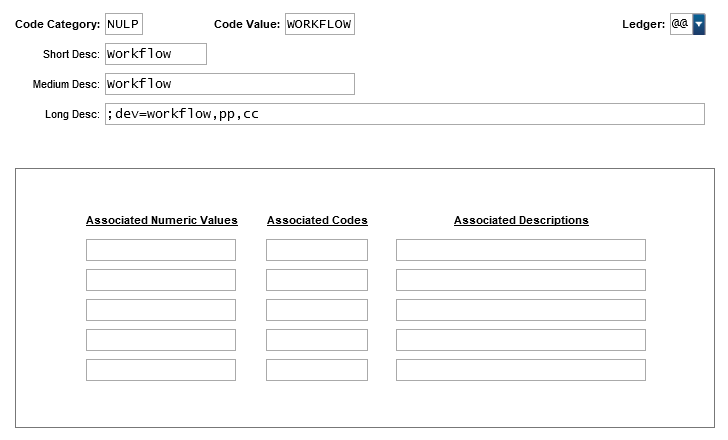
The name "Workflow" is merely a suggestion. If you wish to name this entry something other than "Workflow," be sure to adjust the common code setup (NULP/XXXXXXXX) to reflect the alternate name.
Common Code
Add a NULP/XXXXXX common code to use for printing from BusinessPlus. Our example uses common code NULP/WORKFLOW.
Workflow Model
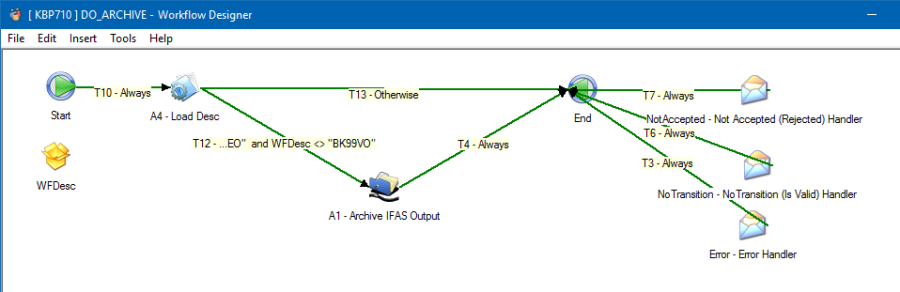
Load the Workflow Model from the CD (DO_ARCHIVE.wdl) into the Workflow Designer.
Security
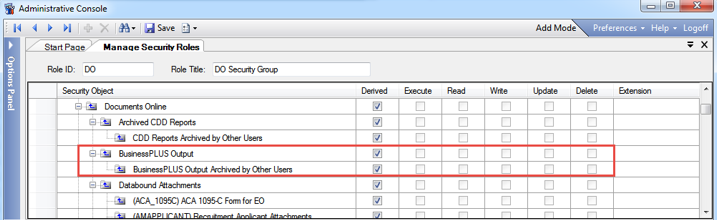
Users need to be assigned security permissions to archive BusinessPlus output. This configured under the security administration section for Manage Security Roles in the Administrative Console.
Security permissions are role-based, and selected groups can be granted Execute, Read, Write, Update, and Delete privileges.